What does archiving a post on Instagram do is one of the most frequently asked questions by users managing their social media presence in 2026.
Archiving is Instagram’s hidden gem feature that allows you to temporarily hide posts from your public profile without permanently deleting them—preserving all likes, comments, and engagement metrics intact.
This powerful tool transforms how content creators, businesses, and everyday users manage their Instagram profiles.
Table of Contents
Understanding Instagram Archive: What It Really Does

The Basic Function of Instagram Archive
Instagram archive acts as a private storage vault within your account. When you archive a post, it immediately disappears from your public grid but remains accessible exclusively to you.
The beauty of archiving lies in its reversibility. Unlike deletion, which permanently removes content, archiving creates a temporary hiding space where your posts live safely until you decide to restore them.
What Happens When You Archive a Post
The moment you tap “Archive” on any Instagram post, several things occur simultaneously. First, the post vanishes from your profile grid instantly—followers and visitors can no longer see it.
Second, all engagement data stays completely intact. Every like, comment, share, and view count remains attached to the post. The original timestamp also stays preserved, meaning when you unarchive it, the post returns to its exact chronological position.
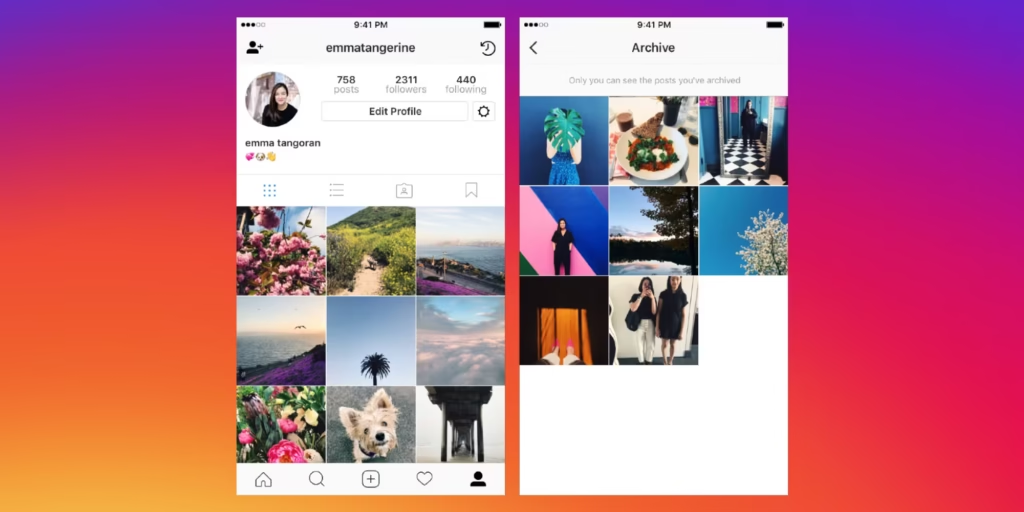
Third, the archived content moves to a dedicated Archive section accessible only through your profile menu. This private folder organizes your hidden posts, stories, and live videos separately for easy management.
Types of Content You Can Archive on Instagram
Archiving Instagram Posts (Feed Posts)
Feed posts—your standard photos, videos, and carousel posts—can all be archived individually. These are the most commonly archived content types as they’re permanently visible on your grid.
When you archive a feed post, it affects only that specific piece of content. Your other posts remain visible, and there’s no indication to followers that anything has been removed or hidden.
Archiving Instagram Stories
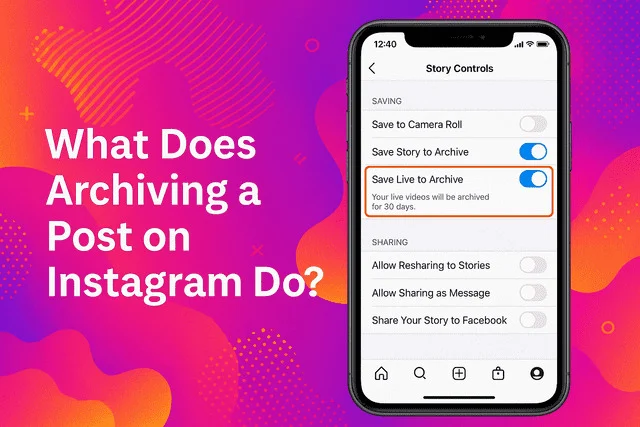
Instagram Stories can also be archived, though this works slightly differently. Stories automatically archive after their 24-hour lifespan expires if you have auto-archive enabled in your settings.
Archived stories remain accessible indefinitely, allowing you to revisit old memories, repurpose content, or add them to Highlights whenever you choose. This feature has become essential for content creators who want to preserve their story content.
Archiving Instagram Live Videos
Live videos broadcast on Instagram can be archived as well. After your live stream ends, Instagram gives you the option to save it to your archive rather than having it disappear forever.
This allows you to review your live content, share clips, or even download the full video for repurposing on other platforms. Many creators use archived lives as raw material for edited content.
The Complete Benefits of Using Instagram Archive Feature
Benefit 1: Maintain Profile Aesthetics Without Losing Content
The most obvious benefit is aesthetic control. Your Instagram grid tells a visual story, and sometimes older posts don’t fit the current narrative you’re creating.
Archiving lets you curate your feed to perfection while keeping those memories safe. Fashion influencers often archive seasonal content, while businesses hide outdated product launches without losing valuable engagement data.
Benefit 2: Preserve All Engagement Metrics and Data
Every archived post retains its complete engagement history. This is crucial for business accounts that track performance metrics, analyze trends, and make data-driven decisions.
Unlike deletion, which destroys all analytics permanently, archiving keeps every metric accessible. You can still review insights, see who engaged, and understand what performed well even years later.
Benefit 3: Test Different Grid Layouts and Strategies
Content creators frequently use archiving to experiment with grid arrangements. You can temporarily hide posts to see how your profile looks with different color schemes or content types.
This trial-and-error approach would be impossible with deletion. Archiving provides the freedom to test, adjust, and perfect your visual strategy without permanent consequences.
Benefit 4: Manage Seasonal and Time-Sensitive Content
Businesses love archiving for managing promotional content. Holiday sales, limited-time offers, and event announcements become irrelevant after their expiration dates.
Rather than cluttering your profile with outdated promotions, archive them when they’re no longer relevant. You can even unarchive and reuse them when the next season or event rolls around.
Benefit 5: Privacy Control Over Your Digital Footprint
Sometimes life changes, and certain posts no longer represent who you are. Maybe you’ve evolved personally, changed careers, or simply outgrown old content.
Archiving gives you privacy control without erasing your history. You can hide posts from employers, new connections, or anyone viewing your profile while keeping those memories for yourself.
Benefit 6: Avoid Negative Consequences of Deletion
Deleting posts can have unintended consequences. It creates gaps in your posting history, potentially confuses your algorithm performance, and permanently destroys content you might later regret losing.
Archiving eliminates these risks entirely. There’s no algorithmic penalty, no regret factor, and no permanent loss—just temporary hiding with full restoration capability whenever needed.
How to Archive Posts on Instagram: Step-by-Step Guide
Archiving a Single Post (Mobile App Method)
Archiving individual posts takes only seconds. Open the Instagram app and navigate to your profile by tapping your profile picture in the bottom right corner.
Find the post you want to archive and tap on it to open it fully. Look for the three-dot menu icon in the top right corner of the post.
Tap the three dots to reveal a menu of options. Select “Archive” from the list. The post disappears from your grid immediately and moves to your Archive folder.
Archiving Multiple Posts Using Bulk Archive (2026 Update)
Instagram introduced bulk archiving capabilities, making it easier to hide multiple posts simultaneously. This feature is perfect for major profile overhauls or rebranding efforts.
Go to your profile and tap the three-line menu icon (hamburger menu) in the top right. Select “Your Activity,” then navigate to “Photos and videos” and tap “Posts.”
You’ll see your entire post grid. Tap “Select” in the top right corner to enable multi-select mode. Now tap each post you want to archive—a checkmark appears on selected thumbnails.
You can use date range filters to archive everything from specific time periods, like “all posts before 2024.” Once selected, tap “Archive” at the bottom to hide all chosen posts at once.
How to Archive Instagram Stories
Stories archive automatically if you’ve enabled the setting. To check this, go to Settings > Privacy > Story, and ensure “Save to Archive” is turned on.
To manually archive a story before it expires, open the story, tap the three-dot menu, and select “Archive.” The story immediately moves to your Stories Archive.
How to View and Access Your Archived Posts
Accessing Your Archive Folder
Finding your archived content is straightforward. Open Instagram and go to your profile by tapping your profile picture.
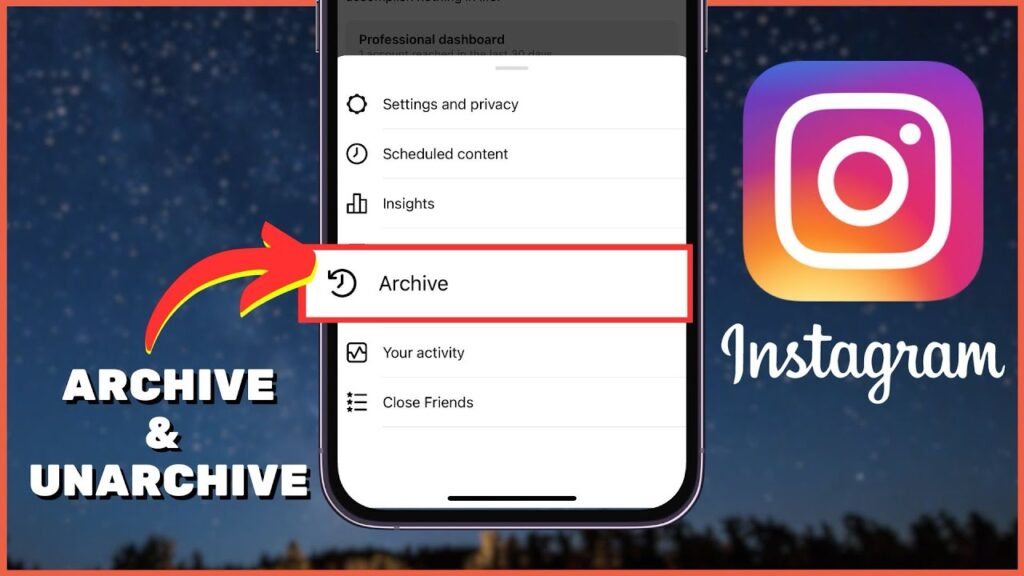
Tap the three-line menu icon in the top right corner. Select “Archive” from the menu options that appear.
Navigating Between Archive Types
When you open Archive, you’ll see a dropdown menu at the top of the screen. This menu lets you switch between three archive categories: Posts Archive, Stories Archive, and Live Archive.
Tap the dropdown and select the type of content you want to view. Each section displays your archived content in reverse chronological order, with the most recently archived items appearing first.
Viewing Archived Content Details
You can tap on any archived post to view it in full detail. All original captions, comments, likes, and engagement metrics are visible exactly as they were when the post was live.
For business accounts, insights and analytics remain fully accessible for archived content, allowing you to review performance data anytime.
How to Unarchive Posts and Restore Them to Your Profile

Unarchiving a Single Post
Restoring an archived post is just as simple as hiding it. Navigate to your Archive section using the steps outlined above.
Find the post you want to restore and tap on it to open it. Tap the three-dot menu in the top right corner of the post.
Select “Show on Profile” from the menu. The post instantly reappears on your grid in its original chronological position with all engagement data intact.
When to Unarchive Content
There are strategic reasons to bring archived content back to your profile. Seasonal businesses often unarchive holiday-themed posts when relevant seasons return.
Influencers might restore high-performing content during slow periods to boost engagement. Brands unarchive posts related to ongoing campaigns or when reintroducing discontinued products.
Posts Return to Original Position
One crucial detail: unarchived posts don’t appear as new content at the top of your feed. They return to their original date position in your grid.
This means they won’t show up in your followers’ feeds as new posts. The algorithm treats them as old content, so don’t expect a surge in engagement from simply unarchiving.
Does Archiving Posts Affect Your Instagram Algorithm?
No Direct Algorithm Penalty
Instagram has confirmed that archiving posts does not negatively impact your account’s algorithm performance or reach. Your active posts continue performing normally regardless of how many you’ve archived.
Many users worry that hiding content might signal inactivity to Instagram’s algorithm, but this concern is unfounded. The algorithm focuses on your current, visible content and user engagement patterns.
Impact on Profile Performance
While archiving doesn’t directly harm your algorithm standing, it can indirectly affect how new visitors perceive your profile. A sparse grid with few posts might seem less established than a fuller profile.
However, a well-curated profile with quality content often outperforms a cluttered profile with mixed-quality posts. Strategic archiving usually improves overall profile appeal and conversion rates.
Engagement Metrics Stay Frozen
Archived posts stop receiving new engagement because they’re no longer visible. Existing likes and comments remain, but no new interactions can occur while the post is hidden.
This frozen state doesn’t affect your account health. Instagram simply treats archived content as inactive rather than deleted.
Common Mistakes to Avoid When Using Instagram Archive
Mistake 1: Archiving Instead of Deleting Inappropriate Content
If content violates Instagram’s Community Guidelines or contains truly regrettable material, deletion is more appropriate than archiving. Archiving keeps content in your account—it’s not truly gone.
For sensitive situations involving privacy breaches, unwanted tagged photos, or genuinely problematic content, permanent deletion provides better protection.
Mistake 2: Forgetting What You’ve Archived
Over time, many users accumulate hundreds of archived posts and completely forget about them. This leads to missed opportunities for content repurposing.
Create a habit of reviewing your archive quarterly. You might rediscover gems worth resharing or content that’s become relevant again.
Mistake 3: Archive Overload
Some users archive so aggressively that their profiles look empty or inactive. An extremely sparse grid can reduce credibility and make your account appear abandoned.
Balance is key. Maintain enough visible content to demonstrate activity and value while archiving only what truly detracts from your current brand.
Strategic Uses of Instagram Archive for Businesses
Content Calendar Management
Businesses can use archiving as part of their content rotation strategy. Hide old promotions immediately after campaigns end to keep your grid current and relevant.
This prevents confusion when potential customers see expired offers or outdated information. A clean, updated profile converts better than one cluttered with irrelevant posts.
A/B Testing Profile Layouts
Marketing teams often test which profile arrangements drive the most conversions. Archive certain posts to try different visual themes, then measure follower growth and engagement rates.
This data-driven approach helps optimize your Instagram presence without permanently destroying content that might prove valuable later.
Handling Crisis Management
During PR crises or controversial situations, businesses might need to temporarily hide certain content while addressing issues. Archiving provides this flexibility.
Once the situation resolves, content can be restored or remain archived based on the outcome. This beats the permanence of deletion during uncertain times.
Preparing for Brand Partnerships
Influencers and creators often archive low-performing posts before pitching to brands. This ensures that when potential sponsors review your profile, they see your best work.
Once partnerships are secured, you can keep content archived or restore it—whatever best serves your strategy.
Instagram Archive vs. Deleting Posts: Key Differences
Comparison Table
| Feature | Archive | Delete |
|---|---|---|
| Visibility | Hidden from profile, only you can see | Permanently removed from Instagram |
| Engagement Data | Fully preserved (likes, comments, shares) | Completely destroyed |
| Reversibility | Can be unarchived anytime | Irreversible—gone forever |
| Timeline Position | Returns to original date if restored | N/A (cannot be restored) |
| Instagram Insights | Data remains accessible | All analytics lost |
| Algorithm Impact | No negative effect | No direct penalty, but history lost |
| Best For | Temporary hiding, aesthetic changes | Removing unwanted/inappropriate content |
When to Archive Instead of Delete
Choose archiving when you want profile flexibility, need to preserve engagement metrics, might want content back later, or are testing grid aesthetics.
Archive for rebranding, seasonal content management, performance testing, and maintaining memories while updating your public image.
When to Delete Instead of Archive
Delete when content violates guidelines, contains genuinely regrettable material, includes privacy violations, or represents content you’ll never want restored.
Deletion is final and appropriate for truly unwanted content. Archiving is for temporary hiding with potential restoration.
How Instagram Archive Impacts Different Account Types
Personal Accounts and Archive Use
Personal users typically archive posts for aesthetic reasons or life changes. Old relationship photos, outdated styles, or embarrassing moments often get archived rather than deleted.
Many users archive liberally on personal accounts since they’re not tracking business metrics. The feature provides peace of mind that memories are preserved privately.
Business and Creator Accounts
Professional accounts use archiving more strategically. Every post represents brand messaging, and archives help maintain cohesive visual identity.
Business accounts also benefit from keeping engagement data intact for performance analysis, client reporting, and future strategy planning.
Influencer Archive Strategies
Influencers often maintain “highlight reels” on their profiles—only showing top-performing, on-brand content. Everything else gets archived but stays accessible for sponsor reviews.
This creates the illusion of consistent quality while keeping all content available for potential repurposing or proof of past partnerships.
Privacy and Security Aspects of Instagram Archive
Who Can See Your Archived Posts?
Absolutely no one except you can see archived content. It’s completely private and inaccessible to followers, blocked users, or anyone visiting your profile.
Even if someone was tagged in an archived post, they can no longer access it. The content exists only in your personal archive folder.
Can Archived Posts Be Recovered by Others?
There’s no way for other users, including Instagram employees (outside of legal requests), to access your archived content. It’s more private than limiting post visibility to followers.
This privacy makes archiving safer than keeping questionable content visible, even to a restricted audience.
Data Protection Considerations
Instagram stores archived content on its servers just like active posts. If you’re concerned about data privacy, remember that archiving doesn’t remove content from Instagram’s systems.
For true data removal, deletion is required. Archiving is about visibility control, not data elimination.
Advanced Archive Features and Tips (2026 Updates)
Smart Archive Recommendations
Instagram introduced AI-powered archive suggestions in late 2025. The app now analyzes your posting patterns and recommends posts that might benefit from archiving.
These suggestions consider factors like outdated content, off-brand posts, low engagement, and changing aesthetic themes. You can accept or ignore recommendations.
Archive Organization Strategies
While Instagram doesn’t offer built-in folders within Archive, you can mentally organize content by creating categories based on date ranges, content types, or campaigns.
Some users maintain spreadsheets tracking what they’ve archived and why, making it easier to find and restore specific content later.
Using Archive with Instagram Scheduling Tools
Many third-party Instagram scheduling tools now integrate with the archive feature, allowing you to plan automatic archiving for time-sensitive content.
This automation helps businesses schedule promotional posts and automatically archive them after campaign end dates without manual intervention.
Troubleshooting Common Instagram Archive Issues
Archive Option Not Appearing
If you don’t see the Archive option, ensure your Instagram app is updated to the latest version. Outdated apps may lack newer features.
Also verify you’re archiving your own content—you cannot archive posts from other accounts, even if you’re tagged in them.
Archived Posts Not Showing Up
If archived posts seem missing, check that you’re viewing the correct archive type (Posts vs. Stories vs. Live). The dropdown menu selection is easy to overlook.
Poor internet connection can also prevent archived content from loading. Try switching networks or restarting the app.
Unable to Unarchive Posts
Unarchiving failures typically stem from connectivity issues or app bugs. Force close Instagram, ensure strong internet connection, and try again.
If problems persist, uninstall and reinstall the app. Your archived content is stored on Instagram’s servers and won’t be lost.
The Psychology Behind Instagram Archiving
Digital Curation and Identity Management
Our Instagram profiles have become extensions of our identity. Archiving allows us to reshape that identity without destroying our past.
This reflects broader psychological needs for control over self-presentation while maintaining personal history. We want the freedom to evolve publicly while preserving private memories.
Fear of Missing Out (FOMO) and Content Preservation
Many users struggle to delete content due to FOMO—fear that they’ll regret losing memories or valuable posts. Archiving solves this perfectly.
It satisfies both the need for a curated public image and the desire to preserve everything. This psychological comfort makes archiving incredibly popular.
The Perfectionism Paradox
Instagram culture promotes perfectionism, leading many users to feel anxiety about their profiles. Archiving feeds this by enabling constant revision.
While this can be healthy for brand management, it can also contribute to social media stress. Finding balance between curation and authenticity remains important.
Instagram Archive Feature Across Different Platforms
Mobile App (iOS and Android) Archive Features
The full archive functionality is available on both iOS and Android Instagram apps. Features are identical across platforms, with occasional iOS-first rollouts for new capabilities.
Mobile remains the primary way users interact with Archive, offering the most intuitive and complete experience.
Desktop/Web Browser Archive Access
Instagram’s desktop website offers limited archive functionality. You can view archived posts through your profile settings, but the experience is less streamlined than mobile.
Archiving and unarchiving are possible on desktop, but the interface is clunkier. Most users prefer handling archive management on mobile devices.
Third-Party Tool Integration
Many Instagram management platforms like Later, Hootsuite, and Buffer have integrated archive features, allowing you to manage archived content alongside your scheduling and analytics.
These integrations help businesses streamline their content management workflows without switching between tools constantly.
Future of Instagram Archive: Predicted Updates for 2026 and Beyond
Potential New Features
Instagram may introduce folder organization within Archive, allowing users to categorize archived content by theme, date, or campaign for easier retrieval.
AI-powered auto-archiving based on performance metrics could help users automatically hide underperforming content while keeping top performers visible.
Enhanced Analytics for Archived Content
Future updates might include comprehensive analytics dashboards specifically for archived posts, showing historical performance trends and suggesting optimal times to restore content.
This would help creators make data-driven decisions about what to keep archived versus what to bring back.
Integration with Creator Tools
As Instagram expands creator features, Archive integration with professional dashboards, content calendars, and monetization tools seems likely.
This would make archiving a core component of professional Instagram strategy rather than just a tidying feature.
Real-World Examples: How People Use Instagram Archive
Influencer Case Study: Seasonal Content Rotation
Fashion influencer @StyleByJenna archives winter content during summer months and vice versa. This keeps her grid seasonally relevant while preserving all content for future use.
When fall arrives, she unarchives her best autumn-themed posts from previous years, creating nostalgia while maintaining feed consistency. Her engagement rates improved 23% after implementing this strategy.
Business Case Study: Campaign Management
Local bakery @SweetTreats archives promotional posts immediately after sales end. This prevents customer confusion and keeps their profile focused on current offerings.
They’ve created a system where seasonal items get archived during off-seasons, then restored when those items return to the menu. This maintains a dynamic, always-current profile.
Personal User Case Study: Life Transitions
User @JamieTransitions archived all college party photos when entering the professional job market. This allowed her to keep memories private while presenting a more mature public profile.
She can still access those memories in her archive but doesn’t worry about potential employers seeing them. This represents one of the most common personal use cases.
Frequently Asked Questions (FAQs)
What does archiving a post on Instagram do?
Archiving hides a post from your public profile while preserving all likes, comments, and engagement data. Only you can see archived content, and you can restore it anytime to its original position.
Can people see when I archive a post on Instagram?
No, archiving is completely private. Followers receive no notifications, and there’s no indication on your profile that posts have been archived. The content simply disappears from public view instantly.
Does archiving posts hurt my Instagram engagement?
No, archiving doesn’t negatively affect your algorithm performance or engagement rates on active posts. Instagram doesn’t penalize accounts for archiving content—your visible posts continue performing normally.
How long do archived posts stay in my archive?
Archived posts remain in your archive indefinitely until you manually delete them. There’s no expiration date or automatic deletion—content stays archived until you decide to restore or permanently remove it.
Can I archive someone else’s post on Instagram?
No, you can only archive posts from your own account. Even if you’re tagged in someone else’s post, you cannot archive it—only hide it from your tagged photos section.
What’s the difference between archive and delete on Instagram?
Archiving hides posts temporarily while keeping all data intact and allowing restoration. Deleting permanently removes posts from Instagram, destroying all engagement data and making recovery impossible.
Can I archive Instagram stories before they expire?
Yes, you can manually archive stories anytime during their 24-hour lifespan by opening the story, tapping the three-dot menu, and selecting “Archive.” Stories also auto-archive if you enable that setting.
Do archived posts lose their likes and comments?
No, all engagement metrics remain completely intact when you archive posts. Likes, comments, shares, saves, and views stay preserved and return with the post if you unarchive it.
How many posts can I archive on Instagram?
There’s no official limit on how many posts you can archive. Users have successfully archived hundreds of posts without issues—Instagram’s archive functions as unlimited cloud storage for hidden content.
Will unarchiving a post notify my followers?
No, unarchiving doesn’t send notifications or make the post appear as new content in followers’ feeds. The post returns to its original date position on your grid without alerting anyone.
Conclusion
What does archiving a post on Instagram do extends far beyond simply hiding content—it’s a powerful tool for digital identity management, brand curation, and strategic content control.
Throughout 2026, Instagram’s archive feature has become essential for everyone from casual users to professional influencers managing their online presence.
The key benefits are undeniable: preserve all engagement data while updating your public image, test different aesthetic approaches without permanent consequences, manage seasonal content efficiently, and maintain privacy over your digital footprint.
Unlike deletion’s permanence, archiving offers reversibility and flexibility that modern Instagram users demand.
Whether you’re rebranding a business account, transitioning between life phases, or simply perfecting your grid’s visual appeal, mastering Instagram’s archive feature empowers you with unprecedented control.